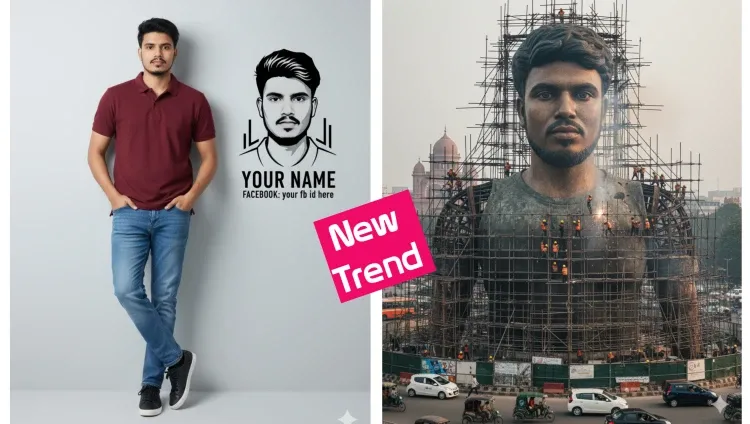
In recent times, social media has become more than just a place to connect with friends it has turned into a platform to express creativity, showcase unique styles, and go viral with trendy content. One of the latest trends taking over Facebook, Instagram, and other platforms is AI-generated photo editing using Google Gemini. These stylish AI edits are now everywhere, and people are loving them because they look modern, creative, and completely different from regular photo editing.
If you have already seen images where someone’s portrait turns into a digital sketch with their name and Facebook ID, or a massive statue-like 3D photo installation in the middle of a city, you’ve witnessed the power of this latest trend. This blog post will give you everything you need to know about this AI photo editing trend with Google Gemini, how it works, why it’s going viral, and how you can use it to make your profile stand out.
What is the Google Gemini AI Photo Editing Trend?
Google Gemini is one of the most powerful AI tools currently available for creating images and generating realistic edits from prompts. The trend we are seeing on social media involves using Gemini prompts to transform ordinary photos into stunning AI artworks.
For example:
- A normal photo of yourself can be turned into a digital sketch illustration with your name and Facebook ID written below.
- A casual picture can be converted into a giant 3D statue-style structure placed in a city environment, making it look like a real-world monument.
This style of AI photo editing is popular because it gives a modern, stylish, and viral-worthy touch to simple photos. People are using these edits as profile pictures, cover photos, and posts on social media to grab attention instantly.
How Does This Trend Work?
The process behind this trend is simple but highly effective. Here’s how it usually works:
- Choose Your Photo – Start with a normal picture of yourself.
- Use a Prompt with Google Gemini – Write a creative prompt where you describe how you want the photo to look. For example:
- “Convert this portrait into a digital sketch with the text ‘YOUR NAME – Facebook: your FB ID’ below it.”
- “Create a giant statue of this person in a busy city environment.”
- Customize with Your Name & Facebook ID – Replace the placeholder text (like “Your Name”) with your own name and ID to make it unique.
- Download & Edit if Necessary – Once Gemini generates the photo, you can do light editing to make it perfect.
- Upload to Social Media – Post the final result on Facebook, Instagram, or TikTok to catch attention and possibly go viral.
Why is This AI Photo Editing Going Viral?
There are several reasons behind the rapid growth of this trend:
- Unique Visual Appeal – People are always attracted to something new and eye-catching. AI-generated sketches and statue-style photos stand out from regular selfies.
- Personalization – Adding your own name and Facebook ID makes the edit feel customized and personal.
- Easy to Create – Thanks to AI tools like Google Gemini, you don’t need professional photo editing skills.
- Social Media Boost – Such images grab attention instantly and often get more likes, shares, and comments compared to regular photos.
- Trend Factor – Since many users are already doing it, more people want to join in to stay updated with the latest trends.
How to Write the Perfect Prompt for Google Gemini
One of the most important parts of this trend is writing the right prompt. A good prompt tells the AI exactly what you want. Here are some tips:
- Be clear and descriptive about the style you want.
- Mention whether you want a sketch, 3D statue, cartoon, or realistic effect.
- Add your name and Facebook ID in the text portion of the prompt.
- Specify the background (e.g., city, wall, street, or digital art background).
Example Prompt:
“Turn this person’s photo into a black-and-white digital sketch illustration. Below the image, add the text: ‘John Smith – Facebook: John.Smith.123’. Make it look stylish and modern for social media.”
Benefits of Using AI Photo Editing for Your Social Media
- Increased Engagement – Eye-catching photos often lead to higher likes, shares, and comments.
- Branding & Identity – Customized AI edits help you stand out and create a unique personal brand online.
- Time-Saving – You don’t need advanced Photoshop skills—AI does all the work for you.
- Trend Participation – Being part of trending edits makes you more visible in your network.
- Creative Freedom – You can experiment with endless styles like sketches, statues, cartoons, or even futuristic looks.
Tips to Make Your AI-Edited Photos Go Viral
- Choose High-Quality Photos – The clearer your original photo, the better the AI output will be.
- Add Your Unique Style – Instead of copying others, experiment with different prompts.
- Use Relevant Hashtags – Hashtags like #AIEditing, #GeminiTrend, #PhotoEditTrend, and #SocialMediaTrend can help you reach more people.
- Engage with Comments – When people react to your photo, reply to them. Engagement boosts visibility.
- Share Across Platforms – Don’t limit yourself to Facebook—share the edits on Instagram, WhatsApp, TikTok, and Twitter (X).
The Power of Prompts: How It Works
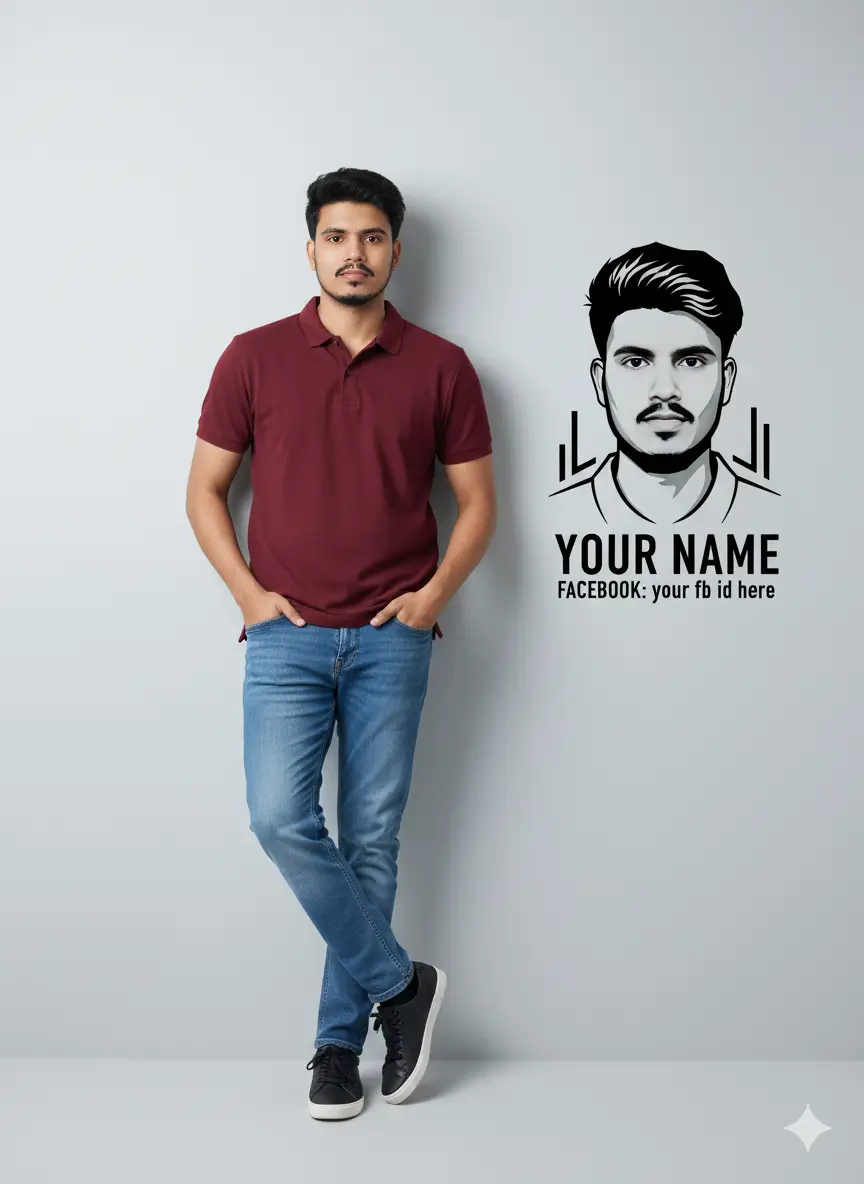
Creating these edits depends heavily on prompts. Let’s look at two trending prompts:
Prompt 1:
“Photo-realistic 8K full-body portrait of this man I’m the above image leaning casually against a clean light-gray wall. He is wearing a meroon polo t-shirt and blue jeans pant black socks, and black sneakers with white soles. Hands in pockets, one leg crossed over the other, relaxed confident pose. On the wall next to him, create a bold black-and-white stylized vector portrait of the same man with modern geometric elements Below the graphic, add clean bold Text: ‘Your Name’ in large letters, and beneath it, ‘Facebook: @Your Fb Id Here’ in smaller font. bright and clean professional ighting studio quality. Mood: modern, minimalistic, premium personal branding aesthetic.”
Prompt 1 for women
“Photo-realistic 8K full-body portrait of this women I’m the above image leaning casually against a clean light-gray wall. He is wearing a meroon polo t-shirt and blue jeans pant black socks, and black sneakers with white soles. Hands in pockets, one leg crossed over the other, relaxed confident pose. On the wall next to him, create a bold black-and-white stylized vector portrait of the same man with modern geometric elements Below the graphic, add clean bold Text: ‘Your Name’ in large letters, and beneath it, ‘Facebook: @Your Fb Id Here’ in smaller font. bright and clean professional ighting studio quality. Mood: modern, minimalistic, premium personal branding aesthetic.”
Prompt 2:
Create a giant hyper-realistic statue based on the given photo, keeping the original face exactly the same without changes. The statue stands tall in the middle of a roundabout in Dhaka, near a famous historical landmark. The statue is still under construction, surrounded by scaffolding, with many construction workers in yellow helmets and orange vests climbing, welding, and working on it. Parts of the statue’s body are still exposed metal framework, while other sections are already detailed and finished.
Google Gemini
Read more post: Trending 3D photo editing
Future of AI Photo Editing Trends
The current trend is only the beginning. With AI tools like Google Gemini, MidJourney, and DALL·E becoming more advanced, we can expect even more creative and personalized edits in the future. Soon, people may be able to generate animated versions of themselves, create AI video edits, or even design entire virtual avatars for their social media presence.
Final Thoughts
The Google Gemini AI photo editing trend is proof of how fast technology is changing the way we express ourselves on social media. What used to take hours of professional editing can now be done in seconds with a simple prompt. By adding your name, Facebook ID, or personal touch, you can create unique images that not only look amazing but also help your profile stand out.
If you want to go viral on social media, now is the perfect time to join this trend. Try creating your own AI photo edits today, upload them to your profile, and watch how quickly people start noticing you.